- Home
- Technical Products
High-Performance Data and Automation
ADAS Simulation and Testing Framework
In-Vehicle Network Communications
Industrial Internet of Things and Digital Factories
AI Machine Vision
Pharmaceutical Cold Chain and Environmental Monitoring
Laboratory Automation and Microfluidics
Environmental Monitoring and Facility Management
Critical Infrastructure Communications and Remote Collaboration
Professional Electronic Testing and Measurement
- Solutions
High-Performance Data and Automation
ADAS Simulation and Testing Framework
In-Vehicle Network Communications
Industrial Internet of Things and Digital Factories
AI Machine Vision
Pharmaceutical Cold Chain and Environmental Monitoring
Laboratory Automation and Microfluidics
Environmental Monitoring and Facility Management
Critical Infrastructure Communications and Remote Collaboration
- Latest Case Studies
- About Us
EN
Ethernet Testing · Software Licensing Applications
Network Failure Simulator
NETWORK IMPAIRMENT EMULATOR
Transform the uncertainties of real-world networks into repeatable test conditions. Simulate latency, packet loss, jitter, and congestion in the lab to validate application performance and pinpoint issues in the field.
- Connect the link under test to replicate real-world network conditions
- Controllable latency, packet loss, jitter, and bandwidth limitations
- L2–L7 Selective Injection, with Support for API Automation
REPEATABLE NETWORK CONDITIONS
EMULATE • VALIDATE • REPEAT
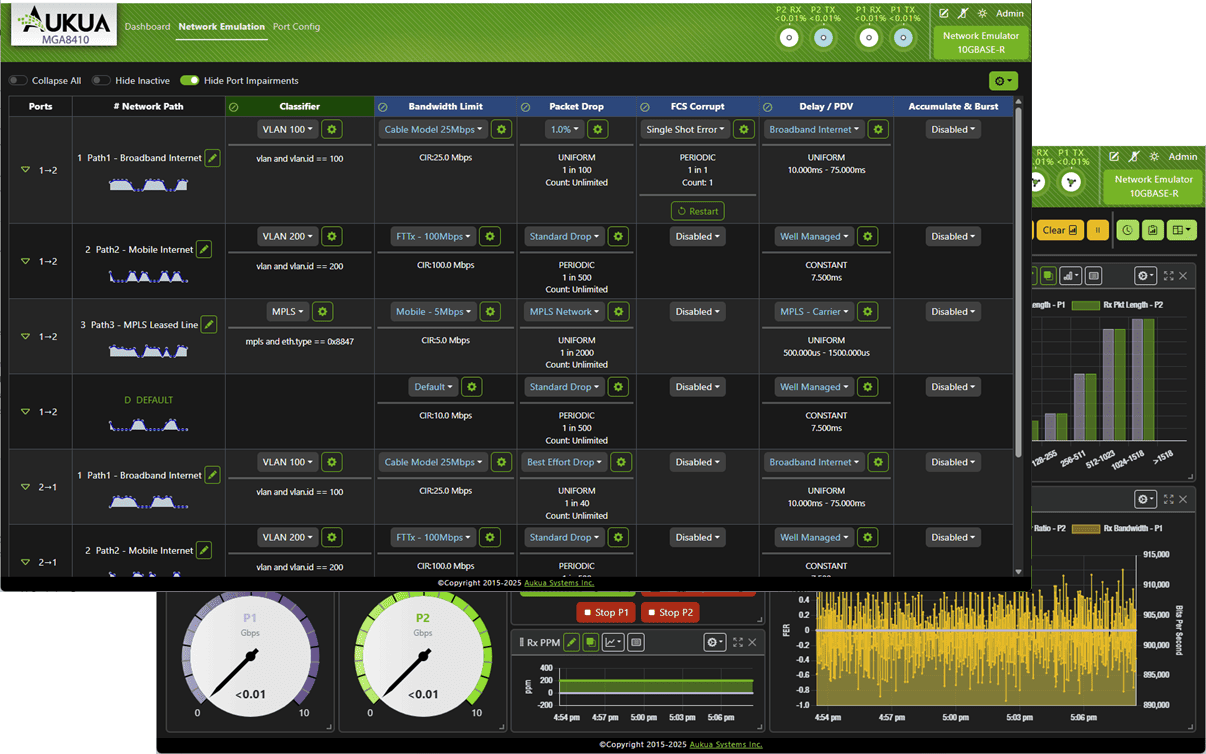
MGA8410 User Interface Example
RECREATE REAL-WORLD CONDITIONS
Bringing the uncertainties of the field back into the controlled environment of the laboratory
From application performance to fault reproduction, we provide a basis for deployment and regression testing using reproducible network conditions.
01
Verify Application Performance
Evaluate the responsiveness and stability of voice, video, cloud services, and data applications under conditions of latency, jitter, and packet loss.
02
Assessing Readiness for Deployment
Before launching a service, migrating infrastructure, or relocating a data center, verify the impact of changes in network conditions on the user experience.
03
Reenacting the Incident
Bring anomalies observed in the production network back to the lab, compare the results under consistent conditions, and assist the R&D and support teams in identifying the root cause.
04
Conduct Anomaly Testing
Actively inject packet and link anomalies to observe the fault tolerance, recovery, and functional performance of devices and systems under non-ideal conditions.
INLINE NETWORK EMULATION
Connect to real traffic paths and introduce controlled network disruptions
Connect the simulator between the two ends of the communication link to route actual business traffic through the configured network conditions and observe the responses from the endpoints and applications.
Schematic Diagram of the Original Manufacturer's Series Connection · Using the MGA8410 as an Example · Click to Enlarge
01
Define Test Conditions
Set the delay, bandwidth, packet loss, and link anomalies based on the specific issues or test objectives.
02
Select Operating Flow Rate
Apply selective damage to the target traffic using L2–L7 protocol filters.
03
Repeat Verification Results
Compare application performance under different conditions, using a consistent test environment to support issue reproduction and regression testing.
For testing, the traffic under test must pass through the simulator; port connections, link speeds, interface modules, and application licenses are configured according to the selected hardware platform.
INTERFACES & PERFORMANCE
Precisely control network conditions to maintain line-speed testing capabilities
Incorporate latency, packet, and link behavior into a single validation process, covering multi-rate Ethernet and industry-specific testing requirements.
The following capabilities must be verified in conjunction with the hardware platform, interface modules, and application licenses. “Nanosecond-level” refers to the precision of delay control; it does not represent a fixed forwarding delay, nor is it equivalent to the precision of timestamp capture.
- Maintain 100% linear velocity performance under damage and filtration settings.
- Supports nanosecond-level precision delay control, including fixed delay, variable delay, and PDV jitter.
- Supports dynamic adjustment of delay and fading to create repeatable multipath network simulation scenarios.
- Packet loss, out-of-order packets, data corruption, and FCS errors cover a wide range of negative functional tests.
- Bandwidth limiting and traffic shaping are used to simulate constrained links and congestion conditions.
- Link Fail / Flap, used to verify abnormal interruption and recovery behavior.
- Use L2–L7 protocol filters to select the traffic to which damage should be applied.
- Supports uniform, Gaussian, and custom damage distributions.
- By combining different damage conditions and distribution patterns, we can simulate both routine fluctuations and abnormal scenarios.
- MGA8410: 10MbE–10GbE, including 2.5G and 5G, with a variety of electrical and optical ports; requires a matching module for in-vehicle BASE-T1 and BASE-RH interfaces.
- XGA4250: The model application brief lists 1G, 2.5G, 5G, 10G, and 25G, and supports SyncE operation without disrupting synchronous transmission at the physical layer.
- For CPRI/Fibre Channel latency simulation on the XGA4250 and SAN Delay Emulator requirements, please verify the interfaces and licensing separately.
CONTROL • OBSERVE • AUTOMATE
Configure in the browser; verify repeatedly during regression testing
From configuring network conditions to viewing real-time results and running automated scripts, this approach makes reproducing field issues and testing for anomalies more systematic.
Set Exception Conditions
- Setting Delay, PDV Jitter, and Packet Loss
- Configuring Bandwidth Limits, Congestion, and Link Fluctuations
- Combining Filters and Distribution Patterns to Focus on the Test Target
Browser Operations and Statistics
- Browser-based interface; no client installation required
- Real-time Statistics, Alerts, and Graphical Results
- The XGA4250 supports a damage scenario library, making it easy to build and call upon common scenarios.
Automation and Regression Testing
- Integrating RESTful APIs into a Scripted Testing Workflow
- Repeatedly run the failure scenario and compare the system's response
- Optional traffic generator and analyzer, online capture and protocol analyzer modes
MGA8410 Damage Configuration Interface · Click to Enlarge
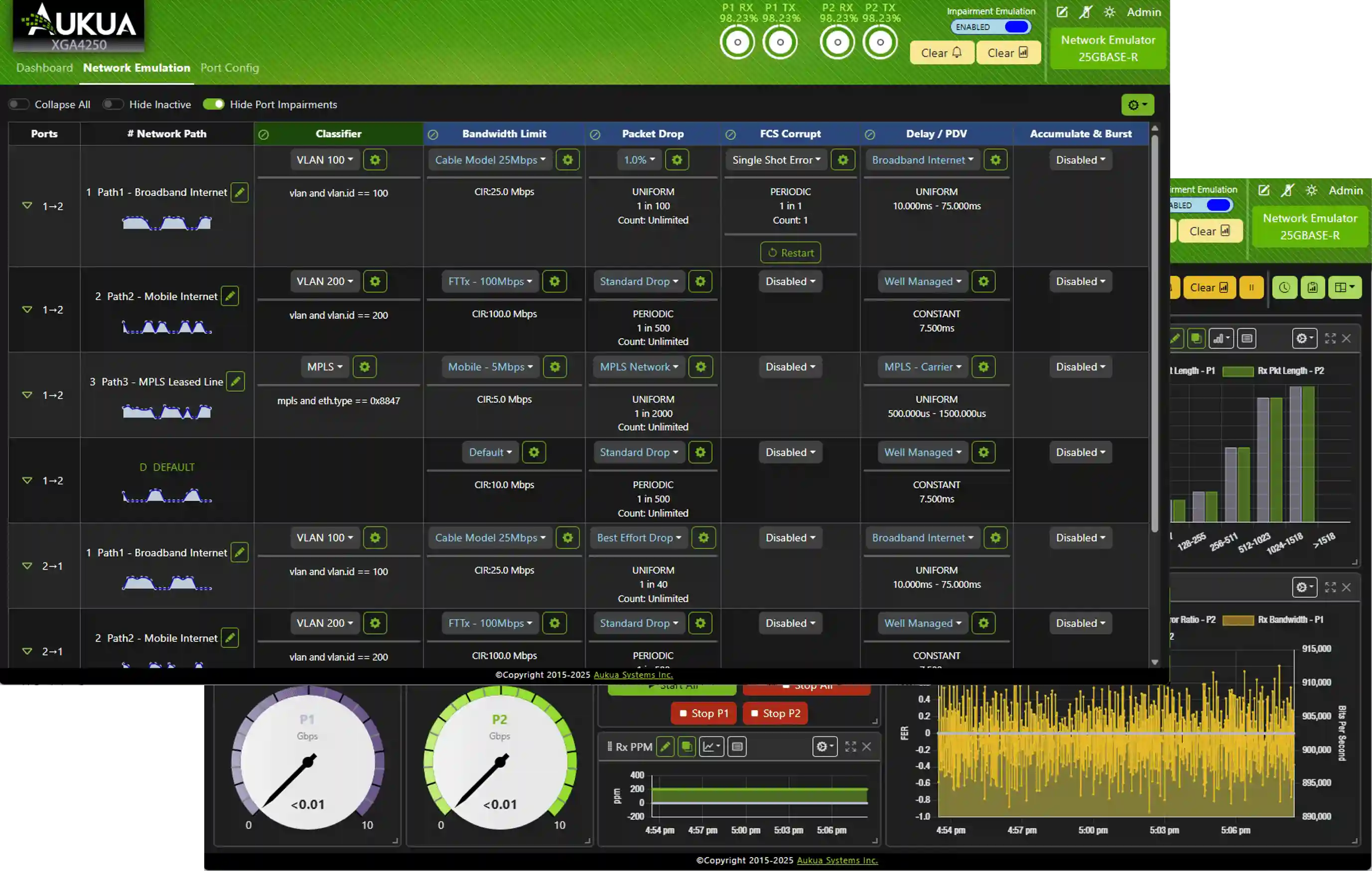
XGA4250 Damage Settings Interface · Click to Enlarge
AVAILABLE HARDWARE PLATFORMS
Select a carrier platform based on link requirements
This application runs on a hardware test platform and is used under the appropriate application license. Configuration settings include the target rate, interface, and test task selection.
MGA8410
Analysis of Multi-Rate Ethernet and In-Vehicle Ethernet
- 10MbE–10GbE Ethernet Environment
- Covers BASE-T1 / BASE-RH In-Vehicle Interface Requirements
- Suitable for multi-interface verification and online fault localization
XGA4250
For online capture and analysis at higher data rates
- 1GbE–25GbE, including 2.5G and 5G speeds
- Analysis of High-Speed Ethernet Links and Protocols
- Suitable for R&D validation, performance monitoring, and troubleshooting
Interface modules, accessories, and application licenses are configured on a per-item basis. If you need to analyze a 10M/100M link on the XGA4250, please contact Hongke to confirm the appropriate interface and module settings. [cite: 14]
HONGKE TECHNICAL SUPPORT
From Test Requirements to Actionable Validation Plans
Hongke provides professional technical consulting, scenario-based solution design, and proof-of-concept (PoC) support.
01 / Professional Technical Consulting
Identify the link speed, interface type, symptoms of the problem, and the events you want to capture.
02 / Scenario-Based Solution Design
In conjunction with the system under test, plan for serial or bypass connections, interface modules, and application licenses.
03 / Proof-of-Concept Support
Discuss the trigger conditions, scope of data capture, and methods for evaluating results, focusing on key use cases.
Professional technical support from HONGKEI to help you succeed in your project.
Leveraging decades of technical expertise in automotive electronics, industrial automation, data security, and life sciences, Hongke provides customers with end-to-end solutions ranging from critical components and precision instruments to system-level platforms. We do more than just supply products; we are committed to helping our customers achieve long-term success through professional technical consulting and innovative optimization.