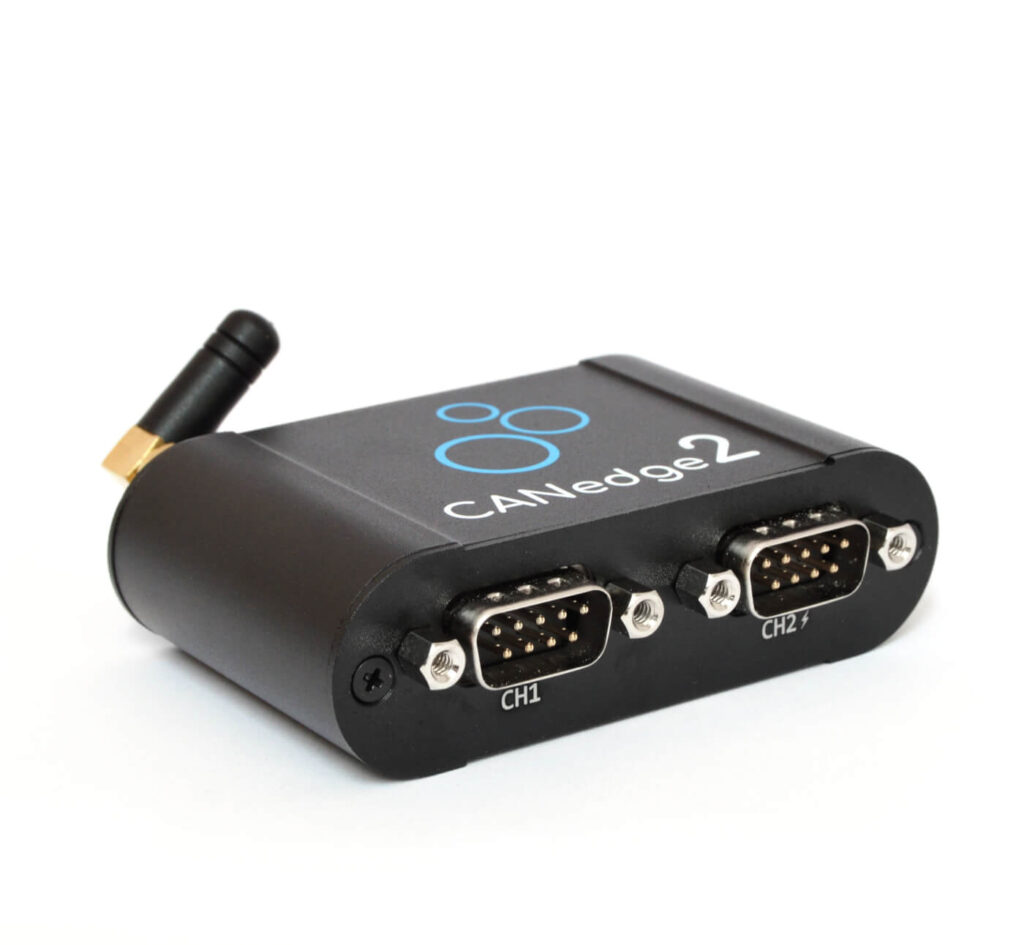
The plug-and-play 2-way CAN / LIN Recorder records time-stamped CAN data (Classical / CAN FD) to an extractable 8-32GB industrial SD card.
The device can be connected via a WiFi access point (e.g. WLAN or 3G/4G router) to securely push data to your server. In addition, device updates can be performed wirelessly.
CANedge2 is ideal for remote information processing and fleet management, as well as for R&D field testing, diagnostics and predictive maintenance.
The software/API is free and open source - free, no locks.
Easily record CAN data in the vehicle/machine - and extract data via SD card or WiFi.
Work with interoperable data using your favorite tools or through 100% free open source software/APIs.
Ideal for remote vehicle information processing, OEM development, diagnostics, and more.
Dimensions only 8 × 5 × 2 cm, weight approx. 100 g
Aluminum housing
5 LEDs
Configurable CH2 5V power off
Security WIFI
Push data to your own server via WiFi
Enterprise-level security
Management Fleet
Easily update configurations/firmware for each fleet wirelessly
Automatic synchronization via WiFi
interoperability
Convert MDF4 to CSV, ASC, TRC, etc.
Free Open Source GUI / API Tools
functionality
Technical Parameters
WiFi Details
Use Cases
functionality
Extremely low-cost, professional-grade CAN recorder
CANedge2 combines innovative design, advanced components and competitive cost advantages.
2 high-speed CAN / LIN (including CAN FD) channels
Removable 8-32 GB industrial-grade SD card (holds months of data)
Binary MDF4 journal file format (supports a wide range of tools)
Advanced Report Filtering and Transfer Functions
Start/stop recording can be triggered by CAN ID and data byte.
Silent Mode, Baud Rate Auto Detection, Cyclic Recording
Data compression and encryption (e.g., GDPR, CCPA compliance)
Quick Start Time
Support for safe disconnection during operation
Open Source Software/API
All software / APIs of CANedge are 100% is free and open source.The
The data is based on the popular MDF4 standard formatstorage, enabling interoperability across CAN tools and customized systems.
Format Conversion:The easy MDF4 converter converts data to formats such as CSV, ASC (Vector), TRC (PEAK), etc., making it easy to analyze with familiar tools.
Data processing:The asammdf graphical interface assists with data handling, including DBC conversion (J1939, OBD2, etc.) and signal graphical display (Windows / Linux).
Conversion of data to physical values via DBC (including J1939, OBD2)
Easily create advanced graphical charts
Supports data resampling or merging
Windows / Linux GUI executable provided (no installation required)
Powerful Python API for Big Data Automation
Automation:Easy-to-use Python APIs let you automate large amounts of data (including the quickstart library on GitHub).
Technical Parameters
Overall
Project
Description
security
CE, FCC, IC Certification
Voltage Test
TÜV SÜD Transient Voltage Test according to ISO 7637-2:2011
Today, remote fleet information processing is critical for vehicles and machinery. However, end-users still face a number of challenges: expensive subscriptions, lack of data ownership, security concerns and vendor lock-in issues.
CANedge2 provides a modernized alternative:
Upload data to your own local/dedicated/cloud servers
Adding WiFi Access Points and Server Information to the Configuration
Record data to SD card and upload automatically when connected to WiFi.
Configurable file splitting to control upload frequency
100% Security: HTTPS, certificate encryption, etc.
Wireless update support (firmware and configuration)
Powering a 3G/4G AP or GPS module via a second channel "power-off".
Zero cost, zero lock-in, interoperable, open source tools
Easily manage data and devices on your server
CANedge2 uploads data to the S3 server, making it easy to manage server files with any S3-compatible tool or SDK. In addition, the 100%'s optional CANcloud Tools Lets you manage your S3 server devices and data from your browser:
Self-hosted - or log in directly to your server via our link
Monitor fleet-wide equipment status via dashboards
Browse, download, share and delete uploaded journal files
Easily update configuration/firmware wirelessly
Browser interface (supports all operating systems and devices)
100% Free and Open Source - Easy to Customize
Technical Features (WiFi / Server)
WiFi
Project
Description
Transmission Method
Automatically pushes data from SD card to server
Agreement
Fast, Secure Transfers with HTTP / HTTPS
Access Point
Add 1-5 WiFi Priority Access Points
Wireless Updates
Supports configurable OTA firmware/configuration updates
WiFi Heartbeat
The device can choose to send the status periodically
WLAN Standard
IEEE 802.11 b / g / n
skyline
External antenna (SMA, 2400 MHz, <2 dBi gain)
server interface
S3 REST - works with MinIO, AWS, Azure and more!
security
Project
Description
HTTPS
Optional data and OTA updates via TLS 1.2
WiFi encryption
WPA / WPA2 support
Certificate
(Optional) WiFi Encryption / S3 Encryption
Firmware Safety
All firmware updates are digitally signed.
user access
Manage user access through S3 policies
Use Cases
Car "black box"
Need to monitor your fleet data over the long term? CANedge2 is ideal for recording fleet data over long periods of time for passenger cars (via OBD2) and heavy-duty trucks (via J1939). With advanced filtering, data compression and a loop recording mechanism, you can store data for up to several years, e.g. for warranty records, legal deposits or fleet optimization analysis.
Recognizing Occasional Problems
Need to troubleshoot an occasional but significant fault? CANedge2 can be used as a long-term diagnostic tool for equipment with episodic anomalies. Simply connect the device to the system and leave it running for continuous logging. When a problem occurs, you can extract the raw data, convert it to DBC and graph it to quickly locate and analyze the problem.
Telematics
Need to monitor and optimize fleet operations in real time? While on the road, CANedge2 can upload data via a 3G / 4G hotspot, which can be powered by a DB9-USB adapter. In addition, data can be automatically synchronized via garage WiFi when the vehicle returns to the garage at regular intervals. Ideal for: OBD2 data logging, truck fleet management, predictive maintenance, driving behavior analysis.
Warehouse Fleet Management
Need to monitor a fleet of AGVs / forklifts in your warehouse? For field managers or OEMs, CANedge2 collects operational data from AGVs or forklifts to optimize battery management and operational efficiency. With strong WiFi coverage, the device supports switching between multiple access points and storing data to local, private or cloud servers.
The size of the raw MDF4 log file depends on the type of application. Without any configuration optimization, the average raw CAN bus log file size is approximately 50-80 MB/hour. Use 8 GB SD Card The CANedge can continuously record the number of hours of operation of the CANedge. 160 hours (about 6.5 days)The
However, CANedge supports a variety of optimized configurations that can significantly reduce the amount of data:
Compression Function: Reduces data size by 50-80% when activated.
filters: Specify acceptance or rejection of specific CAN IDs (support ranges and masks)
Prescaler: Recording can be based on counts, cycles, or data changes (e.g., every 500 ms, or only when data changes)
Control Signal: Automatic start/stop recording based on CAN ID or data mode
After optimization, the actual amount of data for most users is around 1-5 MB / hourThe
SD Card Capacity
Recordable time
approximately equal to
8 GB
1500-8000 hours
About 2-12 months
32 GB
6000-32000 hours
Approx. 8-48 months
If the SD card is full, enable Cyclic Recording ModeAfter that, the device will automatically delete the oldest logs and keep recording.
CANedge2 combines two core areas: high-performance CAN data logging and innovative remote information processing solutions. First, it is a powerful CAN bus data logger with specifications to match the top professional CAN loggers on the market (costing less than 50%). Second, it puts control back in the hands of the user, providing a new perspective on CAN bus remote information processing:
You decide the data transfer method and server deployment.
No subscription fees, we never touch your data!
Adopting modern end-to-end Internet of Things (IoT) security architecture design
Customized solutions to meet your needs.
Provide free CANcloud software as a starting point
In addition, CANedge2 is designed for developers:
Adopts non-proprietary MDF4 industry standard log format, supports asammdf GUI / API (100% open source)
File uploads via S3 object storage architecture, managed by S3 REST API in various programming languages
The configuration file is based on the open source JSON Schema standard.
CANcloud Browser Tool 100% Open Source, Free Modification
Yes, and it's very simple. Simply deploy an S3 compatible server on your PC. MinIO Server (100% free, open source, lightweight solution) is recommended. Download it and run the command to start it.
Please refer to the relevant documents for details.
Yes, the CANedge2 can connect to any WiFi hotspot: WLAN, 3G, 4G, 5G, for example, to a USB cellular WiFi router. The router can be powered through the second port of the device for easy installation in the vehicle (only the CANedge2 needs to be powered through the CAN connector).
Reasons for not building a SIM card:
Built-in SIMs add cost and are not required for all scenarios
External cellular hotspot for more flexibility
Supports up to 5 hotspots, dynamically switchable (e.g. 4G and WLAN)
Up to 5 driver phone hotspots can be added (META markers show SSID)
The CANedge2 does not have built-in GPS, but can be expanded through modularization. The second port provides 5V power for 1-3 external modules. Power can be supplied through the first port while a GPS-to-CAN module is connected to the second port and GPS data will be recorded to an SD card (silent mode).
CANedge2 can split files every 10-86400 seconds or every 1-512 MB. After generating a new log file, it will be automatically uploaded to the server if connected to WiFi. A medium file size of 5-20 MB is recommended to avoid generating too many files. Future plans are to support socketCAN streaming for real-time WiFi streaming CAN data analysis.
Professional technical support from HONGKEI to help you succeed in your project.
HongKe offers a complete range of CAN / CAN FD bus logging and diagnostic tools, including PC-based diagnostic equipment, display and analysis tools, and stand-alone CAN data loggers supporting CAN, CAN FD, LIN, and J1939 in-vehicle protocols for in-vehicle electronics development, system testing, troubleshooting, and on-site data logging applications.