Search

PCAN-Ethernet Gateway FD DR

PCAN-Ethernet Gateway FD DR

CAN FD to LAN gateway with DIN rail and plastic housing
 
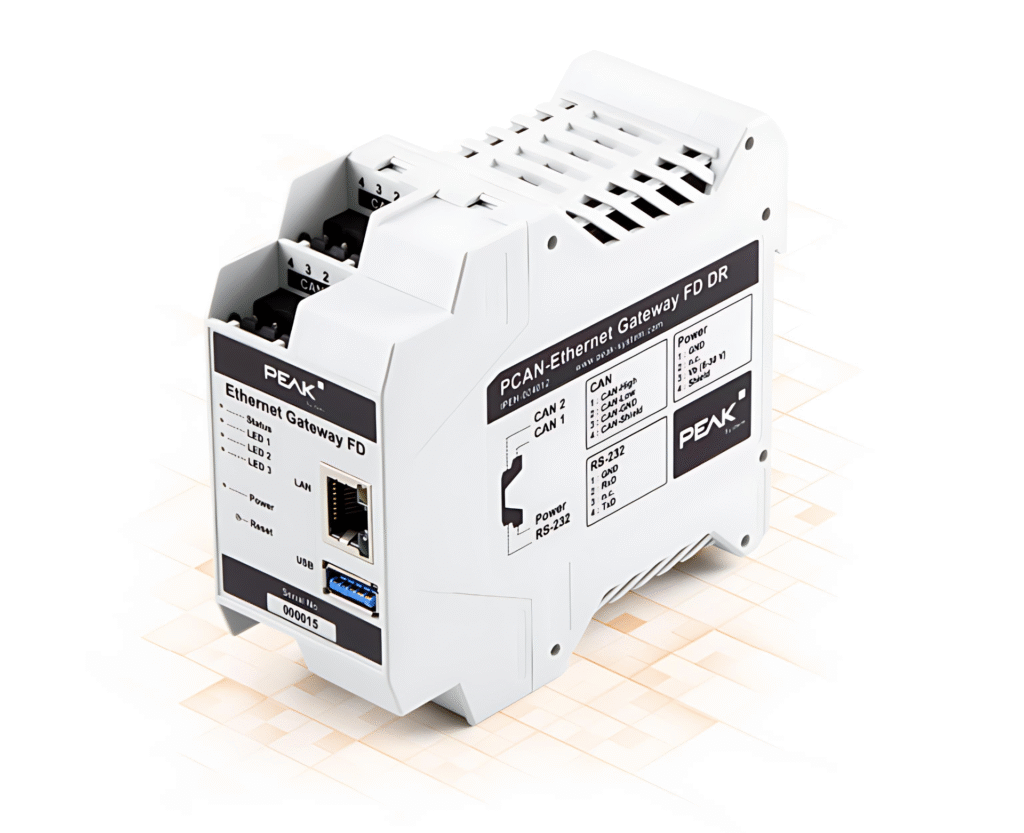
The PCAN-Ethernet Gateway FD DR allows access to traditional CAN and CAN FD buses through an IP network. Additionally, multiple devices can be interconnected using IP between CAN buses. CAN messages are encapsulated in TCP or UDP packets and then forwarded from one device to another via an IP network. The PCAN-Ethernet Gateway FD DR features one LAN port and two CAN FD ports, with a maximum baud rate of 10 Mbit/s. It is equipped with an AM5716 Sitara processor to provide the required device performance.
 
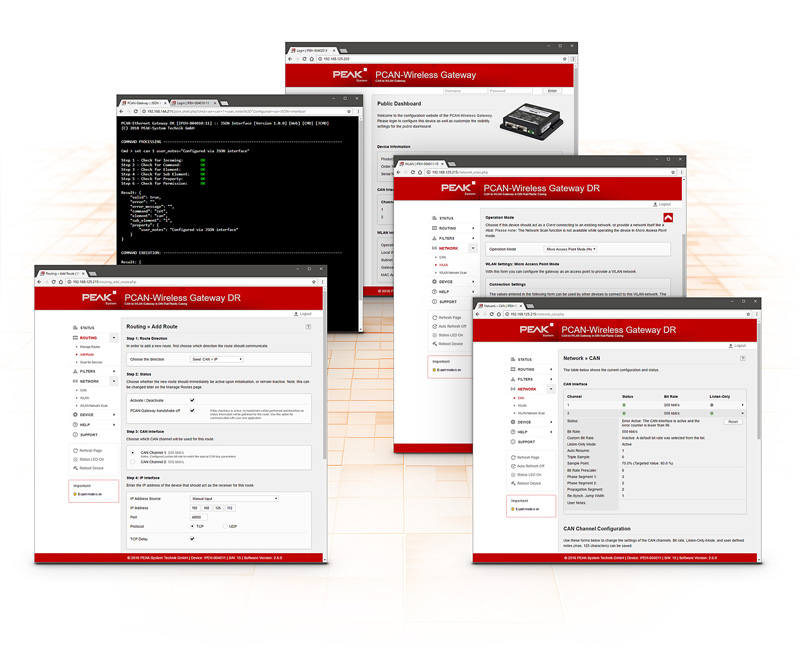
The configuration of the PCAN Gateway product series can be conveniently done through a user-friendly web interface. Additionally, a JSON interface allows for software-based configuration. Both options provide device status information, settings, various communication interfaces, message forwarding, and filters.
 

Main Features

With this gateway, CAN buses can be connected via LAN or WLAN. CAN frames are packaged in TCP or UDP packets and forwarded from one device to another. Thanks to this technology, it is possible to connect to a CAN network over long distances.The configuration of the PCAN-Gateway product family is done via a convenient web interface. To do this, the device must be connected to a PC via LAN or WLAN, depending on the model used, and the web interface can be opened using a general-purpose browser. After a successful login, you can access all information as well as device settings, communication interfaces, message forwarding and filter configuration. Alternatively, the JSON interface can be accessed to develop software to automatically monitor and configure all devices connected to the IP network.

Newspaper Filtering Properties

- Creation and management of filters through a new part of the web interface

- Create filters using different options:

- Filtering messages with 11 or 29 bit IDs

- Support for Range and Mask Filters

- Optional filtration range reversal

- Assigning Filters to Multiple Routes

CAN Channel Setting

- Select a bit rate up to 1 Mbit/s from the default list.

- Setting the user-defined bit rate by register value

- Listen-only mode status switching

LAN interface setting (if available)

- Automatically or manually set the IP address (IPv4) and subnet mask of the device

WLAN interface settings (if available)

- Set the WLAN operation mode to “Infrastructure (Client)”, “Temporary” or “Access Point”.”

- Automatically or manually set the IP address (IPv4) and subnet mask of the device

- Connecting to a wireless network

- Configuration of network encryption

Newspaper forwarding settings and management

- Setting the message transfer between CAN channel and LAN / WLAN (and vice versa)

- Selecting a participating CAN channel

- Define LAN/WLAN stations based on IP address and ports

- Select the transport protocol TCP or UDP.

- Enabling, disabling and editing existing routes

- Disable PCAN-gateway handshaking to allow connections to other devices

Web Interface Functions

- Clear presentation of information about device settings, communication interfaces, message forwarding and filters

- Public Visibility of Defined Status Information

- Import and export device configuration

- Reset device configuration to factory defaults

- Comfortable Software Updates

- Scan IP networks to find more available PCAN gateways for easier route creation

- Layout is automatically adjusted for mobile devices.

- Reboot the device through the website

- Enabling, disabling and configuring the JSON interface

- Integration Help Page

Assigning Filters to Multiple Routes JSON Interface Functionality

- Receive the request as a GET parameter in JSON format for HTTP requests.

- Return the response in JSON format

- Read authorization information about device settings, communication interfaces, message forwarding and filters.

- Setting configurations and adding and deleting message forwards and filters (function deactivated on delivery)

- Getting started is easy with alternative access to the JSON interface through a simulated shell view with integrated files.

Technical Specifications

  • AM5716 Sitara with Arm ® Cortex ® M15 core
  • 2 GByte Flash and 1 GByte DDR3 RAM
  • Linux operating system (version 4.19)
  • Electrical isolation: between CAN channels, between CAN channels and RS-232, power supply, 500V max.
  • CAN, RS-232 and power connections via 4-pole screw terminal block (Phoenix)
  • Monitor and configure the device through a web interface or JSON interface.
  • Update Software via Web Interface
  • Restart and restore factory default settings with the reset button.
  • Plastic housing, width: 45.2 mm, DIN rail mountable, DIN EN 60715 TH35
  • LEDs indicate device status and power supply status
  • PCI Express mini-interface slot, USB port, and an RS-232 port, with features to be updated via OTA at a later date
  • Power supply: 8 to 30V
  • Operating temperature range from -40 to 70 °C (-40 to 158 °F)
  • When the temperature exceeds the limit, it will be actively cooled by a fan.
  • Two-way high-speed CAN (ISO 11898-2)
  • LAN interface (RJ-45 connector with status LED; data transfer using TCP or UDP; baud rate: 10/100Mbit/s)
  • PCAN-Ethernet Gateway FD DR (with DIN rail, plastic housing)
  • Mating connectors for CAN channels, RS-232 and power supply
  • RJ-45 network patch cable (2 m)
  • Handbook in PDF format

Name

No.

PCAN-Ethernet Gateway FD DR

IPEH-004012

Professional technical support from HONGKEI to help you succeed in your project.

HongKe provides professional PEAK CAN / CAN FD Gateway solutions that support multi-protocol conversion from CAN↔Ethernet, CAN↔LIN, etc. to meet the needs of in-vehicle networks and industrial automation. With high-speed data bridging, flexible configuration and high stability, the products are widely used in intelligent transportation, embedded systems and development testing, and are indispensable CAN bus communication tools.


Contact Hongke to help you solve your problems.

Let's have a chat