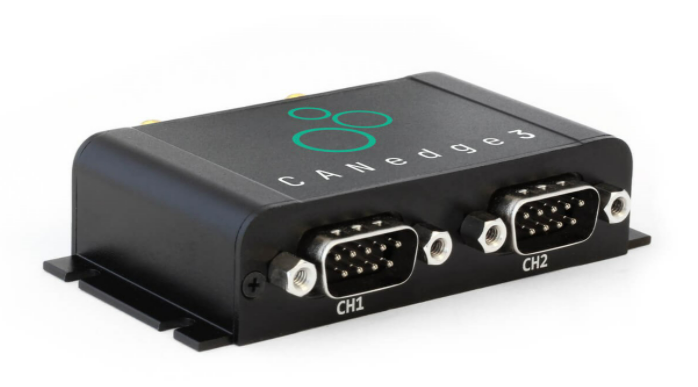
Plug and Play:The plug-and-play 2-way CAN / LIN Logger records time-stamped CAN data (Classical / CAN FD) to a removable 8-32GB industrial-grade SD card for Hong Kong vehicles, construction machinery and industrial equipment data logging applications.
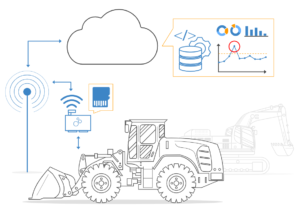
3G / 4G connection + remote update:The device connects over a 3G/4G network to securely push data to your local or cloud server and supports remote firmware and configuration updates for remote management and on-site deployment.
Multiple application scenarios:CANedge3 is suitable for fleet management, remote information processing, OEM R&D testing, vehicle diagnostics and predictive maintenance.
CANedge software / API is free and open source:The software/API is free and open source, with no subscription fees, no vendor lock-in, and supports the standard MDF4 format for easy integration with existing data analysis tools.
Dimensions only 44.2 × 75.0 × 20.0 mm, weight approx. 90 g
Aluminum housing
6 LEDs
Optional SIM card
Supports pushing data to server via 3G / 4G mobile network
Enterprise level security
3G+4G
4G LTE Cat 1 (FDD & TDD)
with 3G (UMTS/HSPA)
interoperability
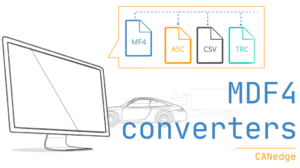
Convert MDF4 to CSV, ASC, TRC, etc.
Free Open Source GUI / API Tools
Extremely low-cost, professional-specification CAN logger
functionality
Technical Parameters
Technical Features (3G / 4G and Server)
Use Cases
CANedge Software / API Tools (all free and open source)
functionality
Innovative Design + Very Low Cost + Professional Specification
CANedge3 combines innovative design, advanced components and competitive cost advantages:
Dual high-speed CAN / LIN (including CAN FD) channels
Removable 8-32GB industrial-grade SD card (holds months of data)
Binary MDF4 log format (broad tool support)
Advanced Report Filtering and Transfer Functions
Triggers start/stop recording based on CAN ID and data bytes
Silent Mode, Baud Rate Auto Detection, Cyclic Recording
Data compression and encryption (compliance with GDPR, CCPA, etc.)
Fast start-up time for safe disconnection during use
Open Source Software / API
All CANedge software / APIs are 100% free and open source.
Data is stored in standard MDF4 format for high interoperability across CAN tools and customized systems
Format Conversion
Provides a simple MDF4 converter to convert data to CSV, ASC (Vector), TRC (PEAK), etc. for easy use of common analysis tools.
Data Processing Flow
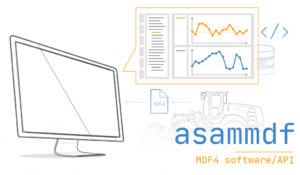
asammdf GUI supports data processing, including DBC conversion (J1939, OBD2, etc.) and signal graphic display (Windows / Linux).
Automation
Easy-to-use Python API to automate large amounts of data (includes GitHub quickstart sample library)
Technical Parameters
Overall
Project
Description
security
CE, FCC, IC Certification
Voltage Test
TÜV SÜD Transient Voltage Test according to ISO 7637-2:2011
Warranty
1 Year Maintenance
Technical Support
Free, fast, high-quality technical support
Origin
Denmark
Software
100% Free and Open Source
Technical Papers
Web Page / PDF format file
CAN / LIN Bus
Project
Description
conduit
2 x CAN / CAN FD + 2 x LIN 2.0 (from station)
Agreement
j1939, obd2, canopen, nmea, 2000
baud
Auto Detection / Easy / Advanced Customization
Data Logging
Project
Description
SD card
8-32 GB Extractable Industrial Grade SDHC
Live Clock
50 µs resolution (with spare battery)
File Format
MDF4 (.MF4) - easy handling and conversion
security
100% Electrical Safety
configure
Advanced Configuration Options
Mechanical Characteristics / Power Supply
Project
Description
Connectors
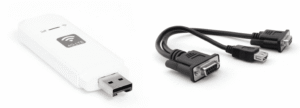
2 x DB9 (adapter cable provided)
power supply
+7V to +32V DC (DB9 interface via Channel 1)
power wastage
< 24W
sizes
44.2 × 75.0 × 20.0 mm (LxWxH without antenna)
weights
90 g
LED
6 external LEDs (PWR, CH1, CH2, MEM, WIFI)
Working Temperature
-25°C to +70°C
Protection Level
IP40
Technical Features (3G / 4G and Server)
3G/4G
Project
Description
Transmission Method
Automatically pushes data from SD card to server
Agreement
Fast, Secure Transfers with HTTP / HTTPS
APN Settings
Supports customized APN access points
Wireless Updates
Supports configurable OTA firmware/configuration updates
LTE
Support LTE (3G / 4G mobile network)
skyline
External antenna (SMA, 2400 MHz, < 2 dBi gain)
server interface
S3 REST - Works with MinIO, AWS, Azure, etc.
security
Project
Description
HTTPS
Optional data and OTA updates via TLS 1.2
Certificate
(Optional) 3G / 4G encryption / S3 encryption
Firmware Safety
All firmware updates are digitally signed.
user access
Manage user access through S3 policies
The CANedge3 can be connected to a 3G / 4G USB router to upload data to your local or cloud server. The hotspot can be optionally powered by the device for in-vehicle or on-site deployment.
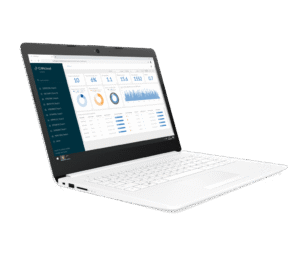
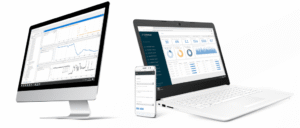
The CANcloud Status Dashboard helps you monitor device data uploads and device operating status.
Use Cases
Reinventing Remote Information Processing
Today, remote fleet information processing is critical to vehicles and equipment. However, end-users still face a number of challenges: high subscription costs, lack of data ownership, security concerns and vendor lock-in.
CANedge3 provides a modernized alternative:
Upload data to your own local/dedicated/cloud servers
Adding WiFi access points and server details to the configuration
Record data to SD card and upload automatically when connected to WiFi.
Supports file split setting to control upload frequency
100% Security: HTTPS, certificate encryption, etc.
Supports wireless update management (firmware and configuration)
Power supply to a 3G/4G access point or GPS module through the second port
Zero cost, zero lock-in, interoperable open source tools
Easily manage data and devices on the server.
CANedge3 uploads data to the S3 server and makes it easy to manage server files with any S3-compatible tool or SDK. In addition, the 100%'s optional CANcloud tool lets you manage devices and data on the S3 server through a browser:
Self-hosting, or direct access to your server via a link
Monitor fleet-wide equipment status via dashboards
Browse, download, share and delete uploaded log files
Easily update configuration/firmware wirelessly
Browser operation (supports all operating systems and devices)
100% Free and open source, easy to customize
CANedge Software / API Tools (all free and open source)
Quickly configure your device
The device's JSON profile can be modified with a simple editing tool - either through a browser when connected to the network or through an SD card when not connected to the network.
Editing tool with user-friendly interface
Option to edit configuration files directly (e.g. using Notepad++)
Supports large-scale OTA configuration deployment with batch tools
Importing data in your familiar tools
Easy MDF4 Converter converts data to other formats for easy viewing in common tools such as CSV, ASC (Vector), TRC (PEAK).
Drag and drop files/folders to the converter to be processed.
(Optional) Automation via CLI or scripts
Supports decompression/decryption and simultaneous conversion
Support Windows / Linux
DBC Conversion and Graphical Data Display (GUI / API)
Free asammdf interface/API to help you work with your data:
Conversion of data to physical values via DBC (including J1939, OBD2)
Easily create advanced charts
Supports resampling and data merging
Windows / Linux GUI executable provided (no installation required)
Powerful Python API for Big Data Automation
Manage your server devices and data
CANcloud is a simple browser tool that requires no installation to manage your S3 server devices and data from any computer or tablet.
Self-hosting, or logging into your server directly
Monitor fleet-wide equipment status
Browse, download, share, and delete uploaded log files.
Easily update configuration/firmware wirelessly
Browser-based (supports all operating systems and devices)
Professional technical support from HONGKEI to help you succeed in your project.
HongKe offers a complete range of CAN / CAN FD bus logging and diagnostic tools, including PC-based diagnostic equipment, display and analysis tools, and stand-alone CAN data loggers supporting CAN, CAN FD, LIN, and J1939 in-vehicle protocols for in-vehicle electronics development, system testing, troubleshooting, and on-site data logging applications.



 EN
EN